
The best science simulations for students in 2027 (ages 11–16)
An honest guide to the best science simulations for students aged 11 to 16 in 2027: PhET, CK-12, Gizmos, Labster, OLabs and more, compared on cost and devices.

The best science simulation for most students aged 11 to 16 is PhET: it's free, it covers physics, chemistry, biology and earth science, and it runs in a browser. CK-12 adds free class tools, ExploreLearning Gizmos offers a bigger paid library with lesson materials, and OLabs gives Indian students free NCERT-aligned practicals from Class 9. The right choice depends on age, budget, devices and how much you need to track.
Who wrote this: Thinkodile publishes this guide, and Thinkodile is our own product. We've included it because it belongs in the comparison, and we say plainly where other tools are better. We checked every other tool against its own website in November 2026. Features and prices change, so check before you commit.
What makes a good science simulation?
A good science simulation lets students change something and see what happens, rather than watch someone else do it. We compared tools for ages 11 to 16 on six things:
- Age fit. Was it made for this age, or borrowed from university or primary-school material?
- Real experimenting. Can students change a variable, measure and repeat, or is it mostly videos and quizzes?
- Devices. Does it run in a browser on Chromebooks, tablets and phones?
- Teacher tools. Classes, assigning work, results, and links to Google Classroom or another learning platform.
- Curriculum. Is it mapped to NGSS, NCERT and CBSE, or another syllabus?
- Cost. Free, free with limits, or paid.
Which tool suits which need?
- A huge free library for almost any topic: PhET.
- Free, with classes and Google Classroom: CK-12.
- The largest simulation library, with ready lesson materials (paid): ExploreLearning Gizmos.
- Realistic lab work for older teenagers (paid, for institutions): Labster.
- Free practicals for NCERT and CBSE Classes 9 to 12: Amrita OLabs.
- Free research-based models, especially particles and genetics: Concord Consortium.
- Short curriculum games up to about age 14: Legends of Learning.
- Story-led quests for ages 11 to 14 that a teacher can present live: Thinkodile.
PhET Interactive Simulations
PhET, from the University of Colorado Boulder, is the best free choice for most classrooms. Its simulations cover physics, chemistry, biology, earth science and maths, and PhET says its sponsors make them free to all students and teachers.
- How it runs: most are HTML5 simulations that run in a modern browser, or can be downloaded to a computer. PhET also publishes apps for iOS and Android.
- Why teachers trust it: every simulation is open source, and PhET tests each one with student interviews and classroom observation.
- For teachers: a library of activities written and shared by other teachers.
- Things to know: the simulations are open-ended, so they work best with a clear task around them. The shared activities help with that.
PhET beats everything else here, including us, on the size of its free library, its range from simple to advanced, and the research behind it.
CK-12 simulations
CK-12 is a non-profit with free resources for students, teachers and schools. It has over 100 physics and chemistry simulations built on everyday examples, with sliders and live graphs and aligned to NGSS, plus over 1,200 short maths and science interactives called PLIX.
- For teachers: classes for assigning and tracking work, with links to Google Classroom, Canvas, Schoology, Clever and ClassLink.
- Devices: CK-12 says its platform works on any device, from phones to Chromebooks.
- Things to know: the simulations cover physics and chemistry. For biology you'll use its lessons and practice instead.
ExploreLearning Gizmos
Gizmos is the biggest simulation library here: over 550 maths and science simulations for grades 3 to 12, which you can filter by standards such as NGSS. It suits schools that want a ready-made lesson around each simulation.
- For teachers: educator resources, guided science lessons and professional development.
- Cost: a selection of Gizmos is free, and you can open a trial account. The full library needs a paid subscription.
- Things to know: it runs in the browser, and it's a commercial product, so check what your school already pays for.
Labster
Labster makes over 300 immersive 3D lab simulations in biology, chemistry, physics and health sciences, mainly for colleges, universities, high school districts and online academies.
- For teachers: automated grading, performance reports, and grade sync with learning platforms such as Canvas and Blackboard.
- Devices: Windows and Mac computers, Chromebooks that run Chrome 114 or newer (Labster recommends its app on low-end models), and iPads with the Labster app.
- Cost: sold to institutions. Labster's pricing page says plans start at $5,000 a year, with free trials for qualified buyers. There's no plan a family can buy.
- Things to know: it's aimed at older students, roughly 15 and up.
Amrita OLabs
OLabs was built by Amrita Vishwa Vidyapeetham with C-DAC Mumbai and funded by the Government of India. It has over 170 interactive simulations of school practicals in physics, chemistry and biology, plus maths and English, for Classes 9 to 12, aligned to NCERT. Amrita says it's free to all students once they register.
- Languages and access: English and several Indian languages, online or with an offline version.
- Things to know: it starts at Class 9, so Classes 6 to 8 need something else.
Concord Consortium
The Concord Consortium is a non-profit research group in the US that makes free STEM resources. They include Molecular Workbench, for virtual labs at the scale of atoms and molecules, the Geniverse genetics activities, and models of chemical reactions and Earth processes.
- For teachers: a class dashboard in its STEM Resource Finder for giving students feedback.
- Things to know: the resources come from different research projects, so browse by grade and topic.
Legends of Learning
Legends of Learning has over 2,000 short games in science, maths and history, made by professional game studios and aligned to standards including NGSS, Common Core and TEKS. Its main game world runs from kindergarten to Grade 8 (about age 14).
- Cost: a free Basic teacher account includes standards-aligned games and up to three live assignments at a time. Premium adds lesson plans, reporting and unlimited assignments.
- For teachers: share games through Google Classroom, another learning platform or a link.
- Things to know: the games are short and vary from studio to studio, so they suit practice and review more than long investigations.
Thinkodile (our own)
Thinkodile has about 47 science quests for ages 11 to 14, across Life Science, Chemistry, Physics and Earth & Space. Each quest opens with a mystery to predict, tells a short Learn story, then gives students a hands-on lab with missions, where a Lab Notebook records every trial. A Final Challenge checks they can explain what they found.
- For teachers: press Present to class, and students join with a class code and a nickname, never an email. Their screens follow yours, each student runs the experiment, and you see everyone's predictions, missions and Final Challenge scores. Every quest has teacher notes and a lesson plan.
- Curriculum: almost every quest is mapped to NGSS and to NCERT Classes 7 and 8, on our curriculum page.
- Devices: a browser on laptops, Chromebooks, tablets and phones (phones play sideways).
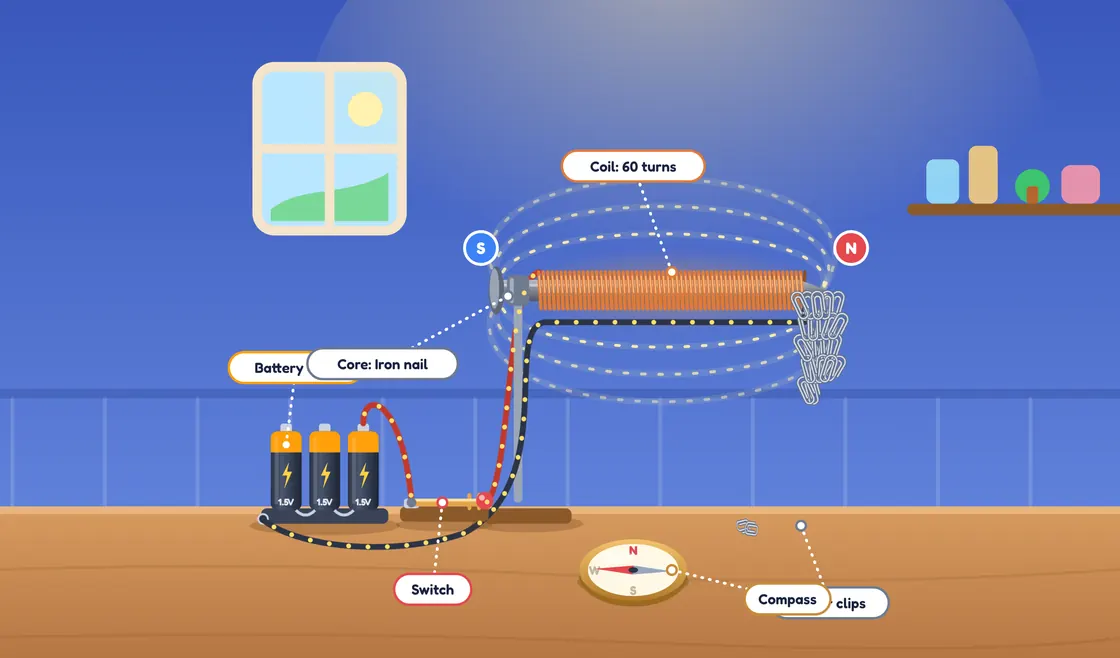
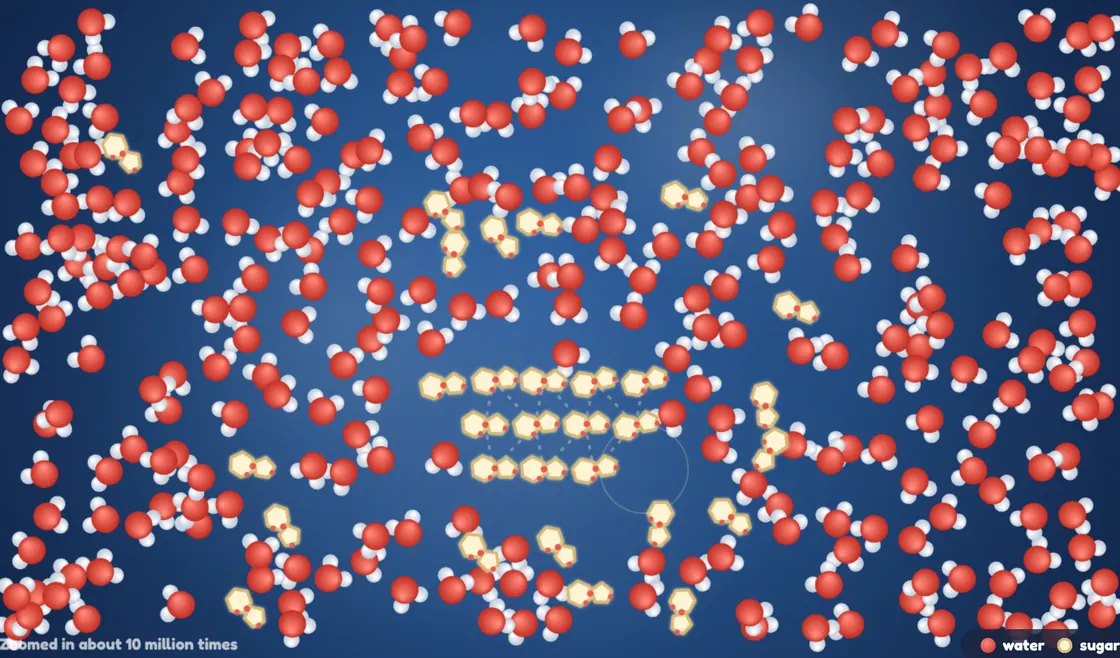
- Cost: a grown-up, a parent or a teacher, creates the account; students never sign up. The free account includes 6 quests: Photosynthesis, Build a Cell, Build an Electromagnet, Particles, Dissolving and Moon Phases. The rest are in Thinkodile Plus for families, or Teacher Pro for presenting to a class.
Where others are better: PhET and Gizmos have far more simulations. CK-12, Legends of Learning and Labster connect to learning platforms like Google Classroom or Canvas; Thinkodile doesn't. Gizmos, Labster and OLabs serve students up to 18, while we stop at 14. Thinkodile is in English only, and it doesn't have the published classroom research that PhET has.
How do you get the most out of a science simulation?
Ask for a prediction first, change one thing at a time, and record the numbers. The same routine works with every tool on this list:
- Predict first. Students commit to an answer before they touch anything.
- Change one thing at a time. The habit from our guide to teaching fair tests applies on screen too.
- Record the numbers. A table of trials beats "it went up".
- Ask what the model leaves out. Every simulation simplifies something. What's missing here?
- Then do it for real where you can. A simulation is a rehearsal for practical work, not a replacement.
Looking for hands-on ideas to follow up with? Try our science fair project ideas for 2027.
In short
- PhET is the best free starting point for almost any topic.
- CK-12 is the best free choice if you need classes and Google Classroom.
- Gizmos (grades 3 to 12) and Labster (older students) are paid, with more lesson materials and reports.
- OLabs is a strong free option for NCERT and CBSE Classes 9 to 12.
- Thinkodile suits ages 11 to 14 who learn best through a story and missions, with 6 quests free.
Questions people ask
Is PhET really free?
Yes. PhET Interactive Simulations, from the University of Colorado Boulder, says its simulations are free to all students and teachers, thanks to its sponsors, and every simulation is open source. They run in a web browser or can be downloaded to a computer, and PhET also publishes apps for phones and tablets. Its site has free classroom activities shared by teachers, too.
What is the difference between a science simulation and a virtual lab?
A simulation is a model you control: you change something, like the length of a pendulum, and watch what happens. A virtual lab copies a real laboratory, with equipment and step-by-step procedures, so students practise a technique such as a titration. Many tools mix the two. For ages 11 to 14, simulations that make the invisible visible, like particles or magnetic fields, are often the most useful.
Can science simulations replace real practical work?
No. Simulations work best alongside hands-on practicals, not instead of them. They let students run many trials quickly, change things that are hard to change in a classroom and see what is invisible. But they can't teach the feel of real equipment, the mess of real measurements or how to work safely in a lab. A good routine is to predict and explore on screen, then test it for real.
Which science simulations work on Chromebooks?
Most browser-based tools do. PhET's HTML5 simulations run in Chrome, CK-12 says its platform works on any device including Chromebooks, and Thinkodile runs in the browser on Chromebooks, tablets and phones. Labster supports Chromebooks that can run Chrome 114 or newer and recommends its app on low-end models. Whatever you choose, try a 3D simulation on your oldest device before planning a lesson around it.
Are there free science simulations for NCERT and CBSE students?
Yes. Amrita OLabs, built with C-DAC Mumbai and funded by the Government of India, offers NCERT-aligned online labs in physics, chemistry and biology for Classes 9 to 12, free once students register. For Classes 7 and 8, Thinkodile maps most of its quests to NCERT chapters on its curriculum page, and six quests are free. PhET is free as well and covers many of the same topics.


